Free VPNs are not free privacy
A free VPN can look like a harmless way around a family firewall. In some models, it can also turn your home connection, device resources, and household trust into the product.
Free VPNs are not free privacy
I caught my son using a free VPN the other day.
Then my daughter wanted it too.
Poor kids. Trapped behind the family layer 7 firewall like it is some kind of digital prison camp. Forced to use mobile hotspot if they ever wanted to sneak around the rules. Tragic stuff.
Except this is exactly why I have been looking at free VPNs, bandwidth resale apps, and residential proxy networks.
The Hola Browser incident reported by Sophos is a useful reminder that freemium still comes with a cost. In that case, Sophos found an unexpected executable, me.exe, being delivered with Hola Browser for Windows. It was not part of the declared certified package and appeared to behave like a cryptominer. BleepingComputer covered the same incident.
The cryptominer is the loud part. The model is the part families need to understand.
Hola VPN has long been one of the examples people point to when explaining why "free VPN" does not mean "private VPN". Often it means the opposite.
Hola's own Bright Data SDK page says free Hola VPN use can be in return for allowing Bright Data to use your device resources and IP address to download public web data. The Bright SDK FAQ describes the model as sharing unused internet bandwidth.
That is the bit families need to understand.
The app says "free VPN".
The business model says "residential internet infrastructure".
And if you are not paying with money, you should be asking what you are paying with instead.
Sometimes it is ads. Sometimes it is data. Sometimes it is your bandwidth. Sometimes it is your home IP address. Sometimes it is your device sitting there in the corner, quietly helping someone else's traffic look like it came from a normal house.
Why kids install this stuff
Kids do not install free VPNs after reading privacy policies.
They install them because they want to watch a football stream, bypass a school block, get around the family firewall, or access whatever their friends are talking about.
They see:
Watch blocked content.
I see:
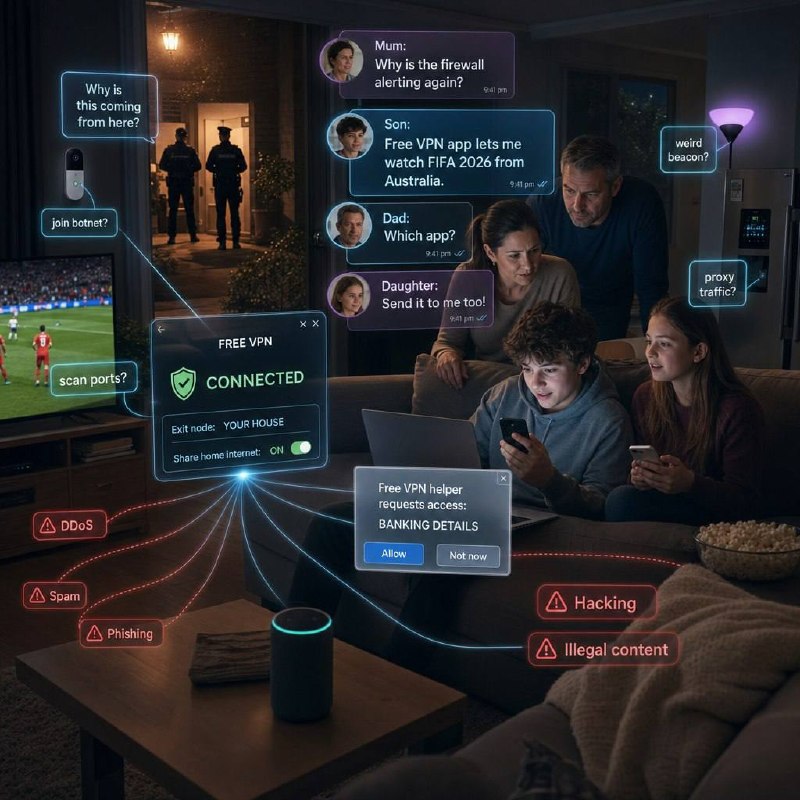
Congratulations, your house may now be infrastructure.
And once traffic appears to come from your home connection, the problem changes. It is no longer just "my kid bypassed a rule".
It can become:
- why is suspicious traffic coming from this address?
- why is the smart TV talking to weird places?
- why is the doorbell suddenly doing network side quests?
- why is spam, phishing, DDoS traffic, scraping, account abuse, or illegal content being routed through residential IP space?
- why is a free VPN helper asking for banking details?
- why are we now having a conversation nobody wanted to have?
That last one is not melodrama. Residential IP space is valuable precisely because it looks like normal households. That makes it useful for legitimate testing and web data collection, but also attractive for abuse. If the exit point is your home connection, the first visible location is your home connection. Tedious little detail, that.
The difference between a VPN and a residential proxy model
A normal VPN provider runs servers. Your traffic goes to the VPN provider, then out through their infrastructure. You still have to trust the provider, but at least the basic shape is obvious.
A peer-to-peer or residential proxy model is different. It can use real user devices and home connections as part of the network. That may be disclosed somewhere in the terms, SDK notice, or consent screen. It may even have legitimate commercial use cases. That does not make it a good fit for a child's phone, a family laptop, or the household network.
The practical family question is simple:
Who else gets to use our home connection, and for what?
If the answer is buried in a privacy policy, an SDK disclosure, or a cheery "share unused bandwidth" pitch, that is already too subtle for most households.
The old research still smells bad
This is not new paranoia dressed up as parenting.
The CSIRO-backed paper An Analysis of the Privacy and Security Risks of Android VPN Permission-enabled Apps looked at 283 Android apps using the VPN permission. The findings were not comforting: malware signals, weak or missing encryption, DNS and IPv6 leaks, tracking libraries, and traffic manipulation.
The paper is old now, but the lesson aged fine. VPN apps sit in the path of your traffic. If the provider is careless, opaque, compromised, or built around incentives you do not understand, the risk is bigger than a random torch app asking for camera permissions.
The Brave Origin angle
There is an uncomfortable truth here: good software needs a business model.
Brave has put a price on a cleaner browser with Brave Origin: USD $59.99 as a one-time purchase for a paid version of Brave aimed at people who want the browser without most of the business-supporting extras.
Honestly, that may be where this all ends up.
Pay for the thing directly, or pay for it indirectly through ads, tracking, upsells, bundled services, bandwidth resale, or some other little compromise hidden in the walls.
At least until Brave decides recurring revenue is unavoidable too and Brave Origin becomes "Brave Origin Plus Pro Max Family Cloud Edition". Because apparently nobody is allowed to just sell software anymore.
What I would tell families
I would not tell families "never use a VPN". That is lazy advice.
A reputable paid VPN can be useful for hostile Wi-Fi, travel, privacy from local networks, or remote access. But a random free VPN used as a bypass tool by a child is a different risk.
For home networks, I would start with this:
- Check phones, tablets, laptops, and browsers for VPN apps, VPN profiles, proxy settings, and browser VPN extensions.
- Search for terms like VPN, proxy, residential proxy, bandwidth sharing, passive income, web unlocker, and unused bandwidth.
- Treat Hola VPN, peer-to-peer VPNs, and bandwidth resale apps as review-required, not harmless utilities.
- Check IoT devices for weird traffic, sudden behaviour changes, or connections to places they have no business talking to.
- Give kids an approved path for privacy and access questions, instead of leaving them to choose between "ask a parent" and "install whatever shield icon appeared first".
- Keep the conversation calm. If you turn it into a courtroom, they will just get better at hiding it.
Blocking has a place. So does explaining the trade before the next "free" app gets installed.
Free VPN never means free privacy.
Sometimes it means dad standing in the hallway wondering why the smart fridge has developed a side hustle.
CyberSafe@Home
This is one of the topics I am covering in S6 CyberSafe@Home: practical home cyber safety for families, without turning the house into a SOC or pretending kids will never try to bypass things.
Home security advice has to survive contact with actual homes. That means kids, school Wi-Fi, streaming sport, cheap apps, smart TVs, dodgy extensions, old routers, family arguments, and at least one device nobody remembers buying.
The point is not fear. It is knowing what you are really agreeing to before the "free" app starts spending your trust.
Sources
- Sophos: You do surprise me.exe: An unexpected executable in Hola Browser
- BleepingComputer: Hola Browser for Windows compromised to deliver cryptominer
- Hola: Bright Data Ethical SDK
- Bright SDK FAQ for end users
- Brave premium / Brave Origin
- CSIRO-backed paper: An Analysis of the Privacy and Security Risks of Android VPN Permission-enabled Apps