Clue 1/4
Who sees it now
simple route
At home, a clean device and HTTPS usually beat adding another company to every trip online.
Trust shift
VPNs can be useful in narrow situations. Free VPNs, unblockers and cheap proxy tools often reduce security by moving trust from your ISP or local network to a provider with worse incentives.
Short version
This does not apply to a work-required VPN or approved remote-access client: use employer-required access exactly as instructed. For consumer VPNs, do not use one by default. Use a provider only for a defined reason and after checking the trust trade.
If you only do one thing, start here
Check phones, laptops and browsers for free VPNs, proxy extensions, unblockers and game/school/streaming bypass apps. Remove anything nobody can explain.
Done when
You can answer this without guessing: Any free VPN installed?
If you have five more minutes
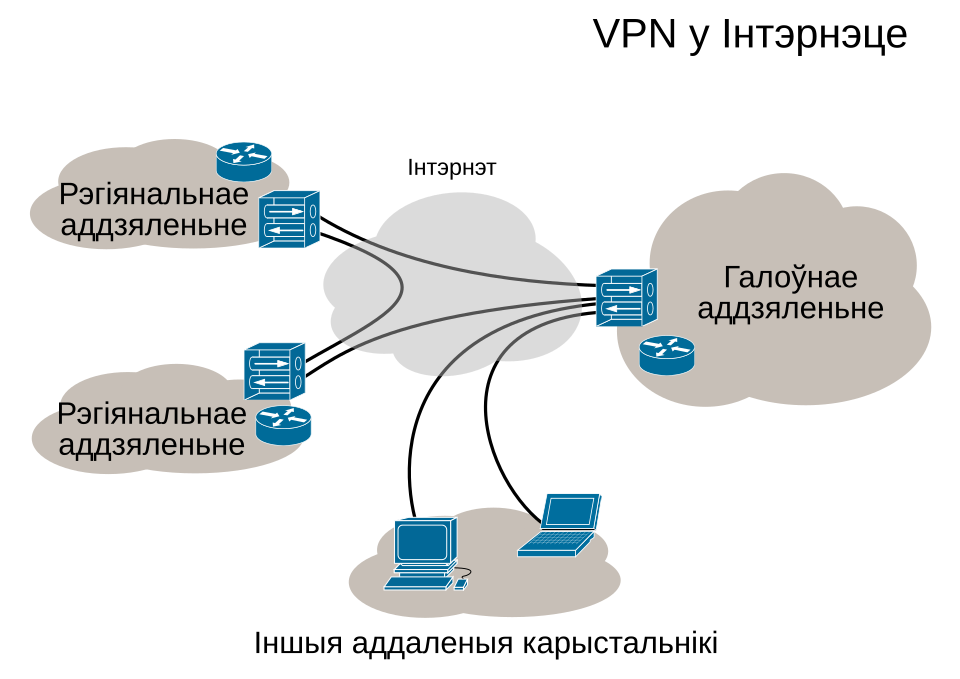
Trust-shift route
The useful question is boring and practical: who can see the traffic metadata now, what incentives do they have, and did the tunnel make the household easier or harder to abuse?
Clue 1/4
simple route
At home, a clean device and HTTPS usually beat adding another company to every trip online.
Clue 2/4
not sharing
If other users are not exiting through your home, there is less weird reputation mess to untangle later.
Clue 3/4
ask path
A household ask path is slower than a bypass, but it keeps the conversation visible.
Clue 4/4
no extra tunnel
Do not install a VPN because an ad made normal browsing sound naked. Pick it for a specific risk.
For normal home use, HTTPS plus a clean device is usually enough. No extra tunnel means one less company in the middle.
There is still a way to ask for access without teaching everyone to install a secret tunnel.
Teaching model, not a scan: these toggles do not inspect your home. Treat amber or red results as prompts for a real check on the device, account, router or family process they describe.
Explain the jargon
Tap a term for the plain-English version and the practical move. No fake mystique, just the bit that changes what you do at home.
A VPN does not erase trust. It moves some trust from your ISP/local network to the VPN or proxy provider.
Do this: Use an assessed provider for a specific reason: clear ownership, transparent policy, no peer-exit or bandwidth sharing, understood leak/kill-switch behaviour and easy uninstall.
A service that routes other people's traffic through home internet connections. Commercial providers sell this access because residential IPs are valuable.
Do this: Avoid tools that sell or share your connection unless you fully understand the consequences.
A setup where users' devices or connections help carry traffic for other users. Some products describe this politely in terms and conditions; the practical question is whether strangers can benefit from your home connection.
Do this: Treat peer-network or bandwidth-sharing language as a stop sign on serious household devices.
The place where tunneled traffic comes out onto the internet. If your home connection becomes an exit node, other people's activity may appear to come from your IP address.
Do this: Do not install apps that let strangers use your connection. Watch for bandwidth-sharing or peer-network clauses.
A low-quality VPN can bypass DNS filtering, confuse account-risk systems, route you through abused infrastructure, or install a client with more access than it deserves.
Do this: Use no consumer VPN by default. If one was installed, check uninstall residue: DNS, extensions, profiles, startup items and account sessions.
A VPN or remote-access client required by an employer. It is not the same decision as buying a consumer VPN because the employer controls the system and the access policy.
Do this: Use it as instructed for work access. Do not replace it, route around it or add a random consumer VPN on top unless your employer approves that setup.
The household habit where controls are treated as puzzles to defeat rather than rules to discuss.
Do this: Make asking easier than sneaking. Fix bad blocks quickly so people do not learn to tunnel around everything.
Self-check questions
Use these quick checks to find the next practical fix. The useful answer is not perfect security; it is whether the safer path is obvious when someone is tired, embarrassed or in a hurry.
What exact risk are you solving: hostile Wi-Fi, travel, access requirement, or just a vague feeling that VPN equals private?
Good sign: There is a named reason, an assessed provider, no peer-exit or bandwidth-sharing clause, and a plan to turn it off when the reason ends.
Watch for: If the answer is 'privacy, I guess', the household may be moving trust to a provider nobody has assessed.
Does the app mention peer networks, bandwidth sharing, residential IPs, unlimited free traffic or helping route other users?
Good sign: Free tunnel and peer-network products stay off family, banking and work-adjacent devices.
Watch for: The dangerous clause is often written politely. It may not say 'strangers can use your internet' in plain English.
When a filter blocks something legitimate, who can review it quickly enough that nobody reaches for a secret VPN extension?
Good sign: The household has a fast ask-and-review path and fixes bad blocks without shaming the person who asked.
Watch for: Slow or punitive reviews teach bypass culture better than any YouTube tutorial.
Scenario
A teenager installs it to dodge a region block; the home IP starts getting challenges.
Better response
Worse habit
Only banning it without explaining why, guaranteeing the next bypass is quieter.
A traveller needs internet from a hotel network with captive portal nonsense and unknown neighbours.
Better response
Worse habit
Assuming any paid VPN makes every hotel, device and account decision safe.
A free privacy, streaming or access app says it may use the device or connection to support the network.
Better response
Worse habit
Accepting peer-network terms because the app says VPN, private or unlimited.
A filter blocks a legitimate school resource, and the fastest workaround found online is a browser VPN extension.
Better response
Worse habit
Letting the child learn that security tools are just puzzles adults are too slow to fix.
Why this advice holds
Defines when a VPN helps, when it makes things worse, and how free services can turn your connection into something other people pay to use.
For normal home use, a VPN is often unnecessary. Modern HTTPS already protects the content of most web sessions from local Wi‑Fi snooping. A VPN can hide some network metadata from the local network, but it also hands that visibility to the VPN provider. If the provider is cheap, unknown or free, that trade can be worse.
Work-required VPNs and approved remote-access clients are the exception: follow the employer's instructions, because that is part of the work access control. For personal use, paid is not enough. Use a consumer VPN only for a defined reason, and only after checking clear ownership, transparent policy, no peer-exit or bandwidth sharing, no unnecessary browser extension, understood DNS leak/kill-switch behaviour, a public security track record where available, and easy uninstall. Even then, prefer your own mobile hotspot where practical.
Commercial residential-proxy providers sell access to real home-IP traffic by bandwidth. Provider names and prices change; the durable point is that residential bandwidth has market value. That does not mean every free VPN is the same thing, but it explains why a free tunnel should trigger questions about telemetry, bandwidth sharing, peer exit and incentives.
A poor VPN can break DNS filtering, bypass parental or work controls, install broad-permission clients, create account-login anomalies, slow updates, and make banks or platforms treat the session as suspicious. It may also concentrate all traffic through infrastructure shared with abuse. That is not an upgrade. That is buying a mystery router in someone else's data centre.
A normal home IP is trusted differently by many services, which is why criminals and gray-market services value residential traffic. This is why households should be wary of any app that wants to share bandwidth, join a peer network or quietly route other people's traffic.
If controls are wrong, fix the control. The ask path must be quick, non-shaming and privacy-respecting; some topics need safety support without turning every request into surveillance. The line to repeat is simple: if a block is wrong, we fix the block; we do not install a mystery tunnel to make the problem invisible.